I’ve been using Claude Code on four AOSP-scale projects: an ARM64-to-x86_64 binary translator, a multi-window patchset for Android, a Chromium WebXR port, and a 64-chapter book on AOSP internals. None of them are the kind of work a coding agent does well out of the box. They’re long. They’re forks of huge upstream codebases. They need a running emulator (or a working WebXR runtime) to verify anything. They’ve all shipped anyway, and not because I’m an expert in any of the domains. I’m still learning most of them.
A short example. Early in the binary-translator project (digitalis), an OpenGL sample
called gles3jni was rendering pure black on the emulator. The screenshot regression
test had been passing for weeks. So had the reference image: also pure black. We’d been
comparing a broken render against a broken baseline. The bug took three Claude Code
sessions to track down. It lived in one ARM64 instruction (FMOV) that the JIT was
translating to the wrong x86_64 register, so glClearColor(0.2, 0.2, 0.3, 1.0) was
arriving as (0.0, 0.0, 0.0, 1.0). The fix was four lines.
This post is about how that’s possible: what you put around Claude Code so it can do AOSP-scale work without producing slop.
The four projects
digitalis: ARM64-to-x86_64 binary translation in
AOSP, built on top of Berberis (Google’s RISC-V binary translator). Adds the ARM64
backend so arm64-v8a-only Android apps (specifically Vulkan apps) can run on x86_64
emulators via NativeBridge. Verified against 22 ARM64-only sample app modules.
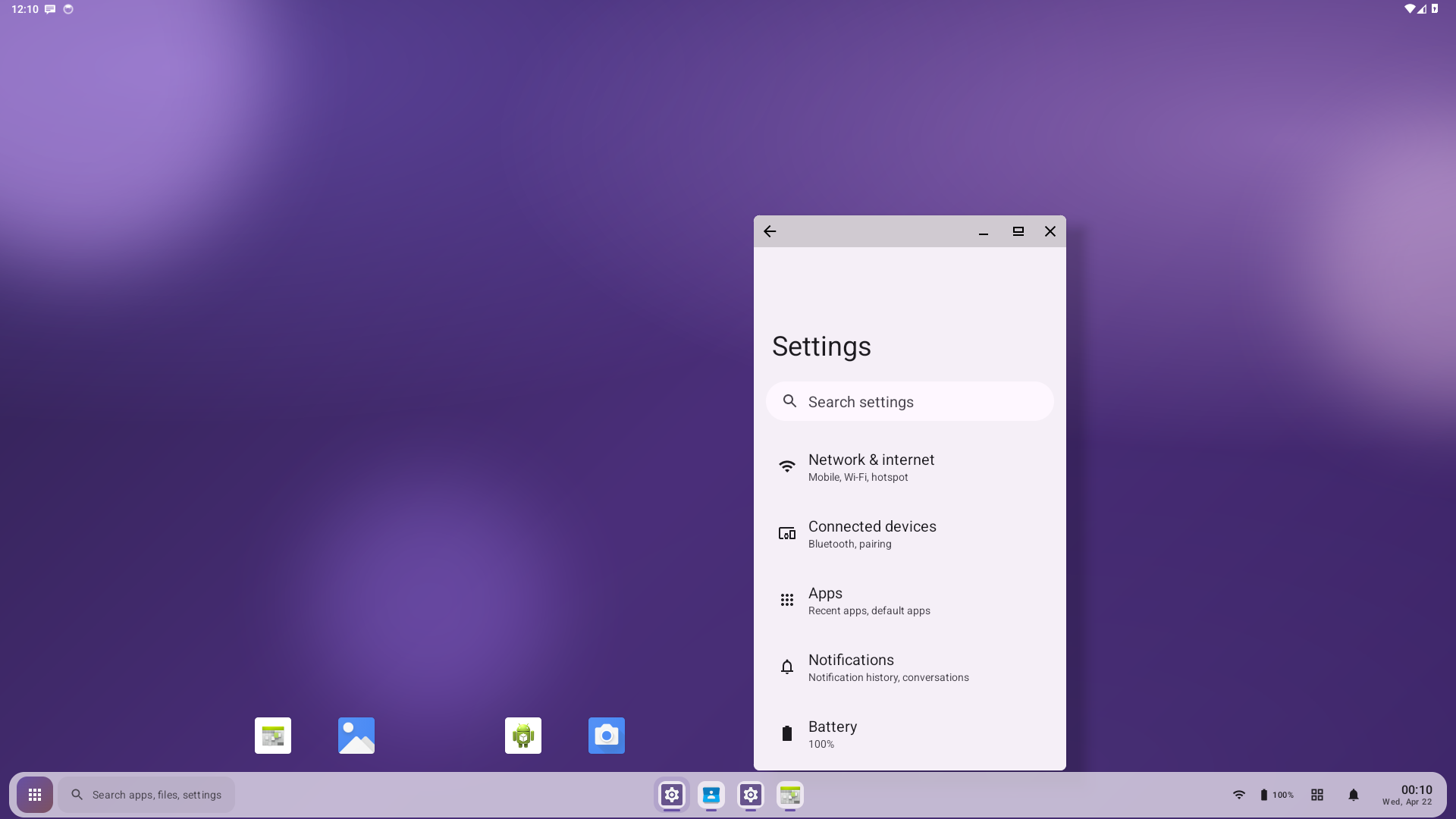
boringdroid: a multi-window patchset on AOSP 14. Taskbar plugin, freeform-by-default windowing, RROs that hide stock UI elements. Visual assets (wallpaper, project icon, taskbar styling) were generated with Claude.
chromium-webxr-linux: a Chromium
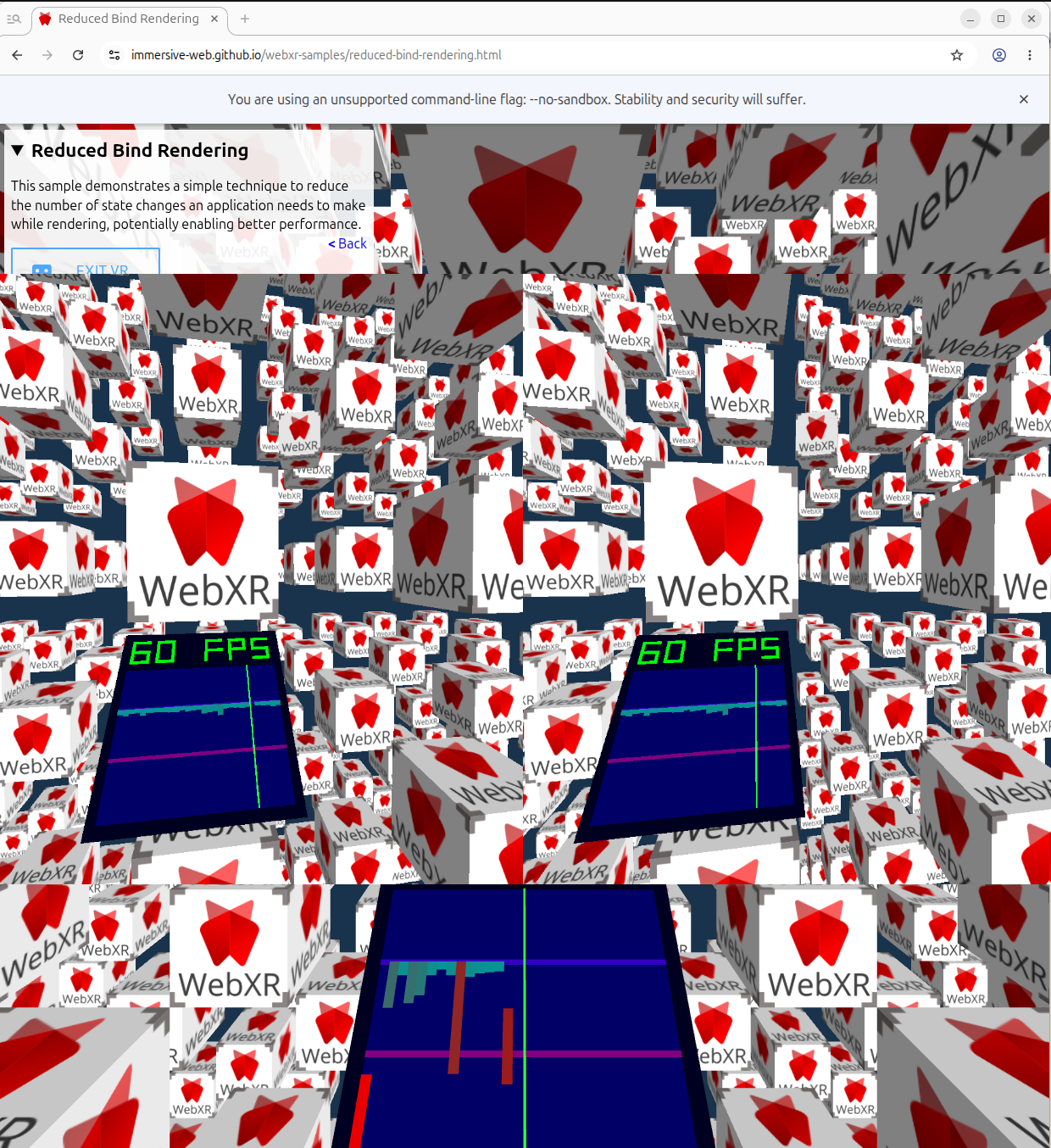
patch that adds WebXR immersive-vr support to Linux builds via OpenXR + Vulkan.
Verified against Monado, the open-source reference OpenXR runtime.
aospbooks (“AOSP Internals”): a comprehensive technical book on the AOSP stack. 64 chapters, 2 appendices, ~227,000 lines, ~1,500 Mermaid diagrams. Each claim references real source paths and line numbers.
Three of these are about editing AOSP-derived code; aospbooks is about reading and explaining it. The patterns below work for both modes, even though the failures look different (a bad fix vs. a plausible-sounding chapter that doesn’t match the code).
Ten patterns, all forms of harness engineering: scaffolding that bridges the gap between what coding agents can do today and what AOSP-scale work demands. Patterns 1–3 keep state alive across sessions, because no single context window holds an AOSP bug hunt. Patterns 4–8 are about verification, because Claude is confident even when wrong. Patterns 9–10 are about output trust, because plausible-sounding output isn’t the same as correct output. None of this is the “real” work of any project. The real work just doesn’t happen without it.
Project state that survives sessions
The first three patterns are the substrate. Without them, every session starts from zero and you can’t tackle any problem larger than one context window.
1. CLAUDE.md as a behavioral contract
Early in digitalis, I asked Claude to fix a failing screenshot test on hello-vulkan.
It edited the sample app’s render code until the test passed. The translator bug it was
hiding was real, and I had to undo the edit. The rule that went into CLAUDE.md the next
session: “Fix root causes in the translator, not workarounds in samples.” That’s what
CLAUDE.md is for. It’s not documentation; it’s the constitution. Rules Claude breaks by
default, and only those rules.
Examples I rely on:
- digitalis: “Fix root causes in the translator, not workarounds in samples. When a sample
app fails, the bug is in the binary translator. Do not modify code under
sample/hellodigitalis/to work around translator bugs.” Without this, Claude will edit the failing test to make it pass. - digitalis: “Decoder dispatch order matters. Multiple instruction groups share encoding prefixes. Silent mis-routing produces wrong results without crashes.” Encodes a class of bug Claude has hit before so it doesn’t reintroduce it.
- boringdroid: “Build production/test APKs with Soong (
m), not Gradle.” AOSP modules need a full-tree build to link against framework jars. - aospbooks: “Every claim references real AOSP file paths with line numbers.”
- aospbooks: “Visually verify Mermaid diagrams. Parse-clean is not enough. Render PNGs and inspect. Diagrams can render with text overflowing rectangles, overlapping nodes, or be parse-clean but factually wrong about the architecture.”
My rule for adding to CLAUDE.md is: add an entry the first time Claude makes a mistake of a given class, not the second time. If a rule already exists and the same mistake happens anyway, the rule is too long or too buried. Shorten it and move it up.
2. Making CLAUDE.md and .claude/ fit the AOSP layout
AOSP isn’t a single git repo. It’s a synthetic checkout assembled by repo sync from a
manifest, with hundreds of independent git repos underneath. The AOSP root directory
itself is not version-controlled, so anything you put there only exists on your machine.
That’s a problem for Claude’s project files: CLAUDE.md, .claude/skills/,
.claude/scripts/, agent definitions. They need to be committed somewhere or they’re lost
on the next sync.
What I converged on: the canonical CLAUDE.md and .claude/ directory live inside a
project-owned git repo where they can be committed (boringdroid/14/boringdroid/,
digitalis/digitalis/). At the AOSP root I keep a duplicate or pointer CLAUDE.md so
Claude finds it when launched there for m builds, plus bootstrap helpers like
lunch-digitalis.sh (one line: lunch sdk_phone64_x86_64_digitalis-trunk_staging-userdebug)
and enable-aosp-building.sh. The AOSP root also has its own .claude/scripts/ for
scripts that must run from there, because m, adb, and emulator expect that cwd.
Build commands need the AOSP root as cwd. Author commands (git commit, git log) need
the project-owned repo. CLAUDE.md should be readable from both. Designing the layout up
front means Claude doesn’t fight the build system every session.
3. Handoff documents with a fixed shape
Long bug hunts span sessions. Each session ends with a handoff document at the project root, following a fixed shape:
- What Was Done: a paragraph.
- How It Was Verified: concrete commands and their outputs.
- Files Modified: a table.
- Current Blocker: what’s stuck and why.
- What Should Be Done Next: concrete next action with file paths.
The gles3jni story from the top of this post lives across
digitalis-handoff-1.md, digitalis-handoff-2.md, digitalis-handoff-3.md. Handoff #1
narrowed the GL error to four suspect ES3 calls. Handoff #2 fixed an unrelated
BSS-zeroing bug that surfaced during the investigation. Handoff #3 root-caused the FMOV
issue and removed the diagnostic logging. None of the three sessions could have started
without the prior handoff in front of it.
A handoff is a self-contained restart point. The next session starts with “read the latest handoff” and is immediately oriented. No paging-in time, no re-deriving the situation.
This is the pattern that lets you tackle a problem too big for any single session. The first working version of digitalis took roughly 15 hours of cumulative work, chained across many sessions, with each one ending in a handoff and the next one starting from it. No single context window held the whole thing. The handoff trail did. Without it, an AOSP-scale bug hunt or feature implementation eventually exceeds the model’s working memory and you’re back at square one. With it, you can stop and resume indefinitely, and the work compounds.
Why this works comes down to two things. First, a long investigation accumulates noise (failed hypotheses, tracebacks, half-read files, debug logs) until even a million-token context gets confused; a handoff is how you carry forward only the facts that matter and drop the rest. Second, a fresh session has no investment in a hypothesis, and that’s often what catches the wrong assumption that the previous session was already committed to. Bonus: sub-agents start cold and need a brief, and that brief is the handoff.
What handoffs actually contain:
- “GL_INVALID_VALUE on every frame in gles3jni. Four suspect ES3 calls listed; proxy
signatures verified. Next: insert per-call
glGetError()in the trampolines to find the offender.” (digitalis-handoff-1) - “FMOV GP↔FP cache coherency bug fixed in
lite_translator.h. JIT was reading ThreadState directly; switched toGetReg/SetRegso the register mapping cache is respected. gles3jni now renders colored quads instead of black.” (digitalis-handoff-3) - “M3 Task 4 IN PROGRESS. ActionCenterWindow overlay won’t render — cross-process IPC issue. Next: introduce an AIDL service binder, same scope as M3 Task 1.” (boringdroid-handoff-29)
- “M5.6 Overview rewrite in Compose landed. 37/37 tests green.
boringdroid-m5-progress.mdflipped[ ] M5.6→[x]. Next: M5.7.” (boringdroid-handoff-58)
By the time of writing, boringdroid has 60+ handoffs in the project root and digitalis is on its third. Each is a self-contained briefing you can drop into cold.
Verifying the work
The next five patterns are the verification stack. They’re the answer to “did the change actually work?”, and they’re what stops Claude from convincing itself a build success is a feature success.
4. The emulator as the test substrate
Both digitalis and boringdroid target the AOSP x86_64 emulator (goldfish), not real
hardware. That’s deliberate, and it’s been one of the most important infrastructure
decisions in either project.
What the emulator gives you that a real device doesn’t:
- A programmable lifecycle. Kill the process with
pkill -9 -f qemu-system-x86_64, boot a fresh instance withemulator -no-snapshot, wait forsys.boot_completed=1. Every step is scriptable, no human flashing. -writable-systemplusadb root && adb remount. You can patch system images, push a newBoringdroidSystemUI.apkover/system/..., restart SystemUI, and re-run the tests without rebuilding the whole image or reflashing anything.- Parallelism on one workstation. Multiple emulator instances on different displays or AVDs, each running a different test branch.
- A known target. The emulator’s GPU (Vulkan via gfxstream), audio, and sensor stack are all documented. A sample app that fails has one reproducible reason to debug.
For digitalis the emulator is the only viable target. The whole point of the project is running ARM64 apps on an x86_64 Android system via NativeBridge, and that combination doesn’t exist on real hardware.
Concretely:
- digitalis:
lunch sdk_phone64_x86_64_digitalis-trunk_staging-userdebug, thenemulator -memory 4096 -writable-system -partition-size 65536 -qemu -cpu host. - boringdroid:
lunch boringdroid_x86_64-userdebug, thenemulator -no-snapshot -writable-system.
Without the emulator, every iteration would involve flashing a physical device. At flash-cycle latencies, the kind of multi-session bug hunt in pattern 3 wouldn’t be tractable. The patterns below all sit on top of this one.
5. Test harnesses as their own project
When digitalis started, I had no way to test it. AOSP doesn’t ship ARM64-only sample
apps as integration tests, and a binary translator needs something to translate. So we
ported 22 of them (hello-vulkan, gles3jni, native-activity, the teapots, the rest)
into sample/hellodigitalis/, gave each a reference screenshot, and built a runner.
None of that was binary-translation work. It was the test harness that made
binary-translation work checkable, and it took longer to build than any single
translator feature it later caught a bug in.
What the test harness looked like in each project:
- digitalis. 22 ARM64-only sample app modules were ported from
android/ndk-samples specifically to be the
integration test suite (Vulkan, GLES, JNI, audio, camera, MIDI, sensors, SIMD). Each
has a reference screenshot. The screenshot diff path supports
--update-referencesfor intentional rendering changes. None of this is binary-translation work. It’s the harness that makes binary-translation work checkable. - boringdroid. UiAutomator tests need a booted emulator, a rooted system partition with
the SystemUI plugin reinstalled and SystemUI restarted, then
am instrumentagainst the test APK. The harness (run-boringdroid-tests.sh) does all that in one call: launches the emulator, waits forsys.boot_completed=1, runsadb root && adb remount, reinstalls, restarts SystemUI, runs the instrumentation, and exits with a real return code. - aospbooks.
serve.sh png NN-slug.mdrenders every Mermaid diagram in a chapter to PNG so they can be eyeballed, by a human or by a reviewer agent.mkdocs buildruns in CI on every push so a broken nav or a parse-error diagram fails fast.
The harness should produce two kinds of output and nothing else: pass/fail, plus concrete failure context when it fails (file paths, error lines, screenshot diffs). Anything in between encourages Claude to read ambiguous output as success.
6. Scripted verify loops, encoded once
Verifying an AOSP-scale project from scratch every session is too slow and too error-prone. The fix is to encode the verify step as a script Claude can call.
| Project | Script | What it does |
|---|---|---|
| digitalis | .claude/scripts/test-samples.sh |
Build all 22 ARM64 sample APKs, install, launch, check for crashes. |
| digitalis | .claude/scripts/test-samples.sh --screenshots |
Same, plus screenshot-diff against reference images. |
| boringdroid | .claude/scripts/run-boringdroid-tests.sh |
Reinstall SystemUI, restart it, run UiAutomator instrumentation, return pass/fail. |
| aospbooks | ./serve.sh png NN-slug.md |
Render every Mermaid diagram in a chapter to PNG so they can be eyeballed. |
The shape is the same in every project: one entry point, deterministic output, pass/fail fast. Claude calls the script after every change instead of inventing ad-hoc verification. Without this, sessions end with Claude convinced the change works because the build succeeded.
7. Land a failing verifier first
Boringdroid’s M1 milestone (moving the taskbar into its own WindowManager window)
opened with a deliberate red bar. Task 1 was “add a failing UiAutomator test” asserting
the taskbar existed in a boringdroid-owned window. It couldn’t pass yet; the
implementation was Tasks 2–4. The handoff for the cycle reported 1 failure, as
intended, and that was the deliverable. The implementation was then judged against a
test that had already been written. Same TDD as anywhere, just operated against a
53-second m BoringdroidSystemUITests build.
In digitalis, screenshot regression plays the same role for visual bugs: the reference image defines correctness, and any pixel diff is the test.
In aospbooks, the PNG render check catches diagrams where text overflows shapes or nodes overlap. Those are bugs the chapter wouldn’t catch in proofreading.
There’s a real failure mode here. The gles3jni screenshot test in digitalis was passing for a long time because the reference image was also all-black: the bug was bad enough to have poisoned the baseline. Visual regression baselines need a curation step. Don’t trust a green test you didn’t watch turn green.
8. Asking Claude to read the screenshot
Pixel-diff against a reference catches changes, not correctness. The other kind of screenshot test is to ask Claude to read the PNG and judge whether the content is right. This works because Claude can read images.
In digitalis the verification has three steps, and the order matters:
- Claude reads the sample’s source code (renderer, shaders, draw calls) and derives what the screen should show. hello-vulkan loads a triangle vertex buffer and a fragment shader that interpolates RGB, so the screen should show a colored triangle on a dark background. native-activity clears with a color that cycles RGB once per second, so at t=5s the screen should be solid green.
-
The CLAUDE.md caches the recurring expectations as a per-module table, so the next session doesn’t have to re-derive every time:
Module Expected content hello-vulkan Colored triangle on dark background gles3jni Instanced colored quads native-activity Solid color (cycles RGB each second, green at 5s) bitmap-plasma Plasma color pattern - After
test-samples.sh --screenshotsruns, Claude opens each PNG and checks the pixels against the expectation from step 1. If hello-vulkan is supposed to show a colored triangle and the PNG is solid black, the binary translator dropped a draw call somewhere, and the bug hunt starts.
The point of step 1 is that the expectation isn’t a guess. It’s derived from code anyone can re-read. The screenshot test is checking the renderer against the code’s intent, not against a frozen reference image that might have been wrong from the start. (That’s exactly how the gles3jni broken-baseline trap from pattern 7 happened.)
Boringdroid uses a thinner version: after framework or RRO changes, the dispatch loop
captures adb exec-out screencap -p > /tmp/verify.png and the rule is direct: “A
passing boot is not sufficient. Screenshot and confirm the taskbar / plugin views are
actually visible, not silently disabled.” No code analysis, just Claude reading the PNG
to confirm something rendered.
Claude’s visual judgment isn’t deterministic. The pattern only works when the expected side is rooted in something checkable: the sample’s source in digitalis, a documented feature list in boringdroid. Without that anchor, you’re back to pattern-matching plausibility, which is the definition of slop.
Trusting what comes out
The last two patterns are about output verifiability. The verification stack above tells you whether code runs; these tell you whether claims about the code are true.
9. Source citations as the anti-slop discipline
If you ever have to answer “did you make this up?”, the only useful response is a file path and a line number.
In aospbooks, every architectural claim cites real AOSP file paths with line numbers.
Digitalis handoffs cite the file and line where each bug lives: gles3jni.cpp:218-224,
lite_translator.h, sys_mman_emulation.cc. The chromium-webxr README points readers at
directories they can open themselves: device/vr/openxr/linux/,
openxr_graphics_binding_vulkan.cc.
That’s what makes the work checkable. If a chapter says SurfaceFlinger does X, you open
frameworks/native/services/surfaceflinger/...:NN and check. If a handoff says the bug
is in FMOV, you read FMOV and decide whether the fix is right.
Without citations, “Claude wrote it” and “Claude made it up” look identical. With them, they don’t.
10. Specialized agents for review
Some checks are easier to delegate to a separate agent than to bake into the main session. Aospbooks uses a small team of reviewer agents to read each chapter and Mermaid diagram before it’s considered done:
- A content reviewer reads the prose against the cited source files and flags claims that don’t match the code.
- A diagram reviewer renders the diagram and checks whether the boxes, arrows, and labels match the architecture the prose describes.
The reviewer agents start with no session history and no investment in the chapter. They’re adversarial by construction. The author agent is biased toward “this looks fine, ship it”; the reviewer is biased toward “explain this.” Splitting them recovers the kind of independent read a human reviewer would give a draft.
The same logic applies in modification mode. A separate agent that knows nothing about the bug hunt can review a fix more honestly than the agent that spent three handoffs producing it.
Honest limits
These projects aren’t done.
- digitalis still falls back to the interpreter for
PMULL2,CNT, andUCVTF Sd, Xn. Correct, but slower than the JIT path. - chromium-webxr-linux has the overlay UI plumbed into the Vulkan graphics binding but not actually constructed on Linux.
- boringdroid still needs human curation for per-version forward-ports. When AOSP refactors
frameworks/base, the project’s region markers tell you what to re-apply, but not how. - aospbooks has errors. A 64-chapter book about AOSP, written this fast, was always going to. The citations are how readers find them.
The Known Limitations and Remaining Work sections in each project aren’t decoration.
Claude will happily claim more than it shipped if you don’t make a habit of writing those
sections. The patterns above are how I make the habit stick.
Avoiding to generate AI slop
I’m honestly not an expert in ARM64-to-x86_64 binary translation. I’m still learning it. Same for parts of Chromium’s GPU process, parts of OpenXR, and a fair few corners of AOSP itself. The point of the patterns above is that the work is real anyway.
The work is real because:
- The verify scripts pass, or fail with specific outputs that get fixed and re-verified.
- The handoffs cite the files and line numbers where the bugs live.
- The chapters cite the source they were derived from.
- The reviewer agents read the work cold.
- The known-limitations sections name what doesn’t work.
None of that requires me to personally vouch for every line. It requires the harness around me to be honest. If the harness is honest, what comes out of it is honest too, even when the human in the loop is still learning the domain.